
Table of Contents
- → 1. The "One-Hour Deletion" Myth: What Really Happens in the Cloud
- → 2. The Three Architectural Models Compared
- → 3. Legal Risks: HIPAA, GDPR, and Privilege Waiver
- → 4. Compliance Case Study: The Medical Malpractice Firm
- → 5. Architectural Privacy Matrix
- → 6. How to Verify Zero Uploads in Your Browser
- → 7. Frequently Asked Questions
The "One-Hour Deletion" Myth: What Really Happens in the Cloud
Almost every online PDF website displays a reassuring promise: "Your files are 100% secure. We automatically delete all uploaded documents after one hour."
As a technology attorney who has audited enterprise data pipelines for fifteen years, I cringe whenever a client relies on that sentence.
When you drag a tax return, medical record, or corporate contract into a standard cloud converter, your document travels across the public internet. It arrives at a remote cloud server operated by AWS, Google Cloud, or an offshore hosting provider.
The server saves your file to a temporary storage bucket or hard drive. A backend script processes the conversion, creates a new file, and writes that to disk as well.
Even if the company honestly intends to run a deletion script sixty minutes later, your unencrypted data sits exposed on remote hardware for a full hour. It is vulnerable to misconfigured cloud permissions, server memory dumps, employee tampering, and government subpoenas.
A promise to delete data later is never a substitute for never collecting data in the first place.
The Three Architectural Models Compared
When choosing document utilities, you are choosing between three distinct architectural paradigms:
- Server-Side Cloud Converters: Your documents are transmitted to remote servers. This requires high outbound bandwidth, exposes confidential data, and creates ongoing regulatory liability.
- Native Desktop Applications: Software installed directly on your operating system (like Adobe Acrobat or desktop freeware). While private, desktop apps require administrator rights, license keys, frequent updates, and can carry dangerous malware payloads.
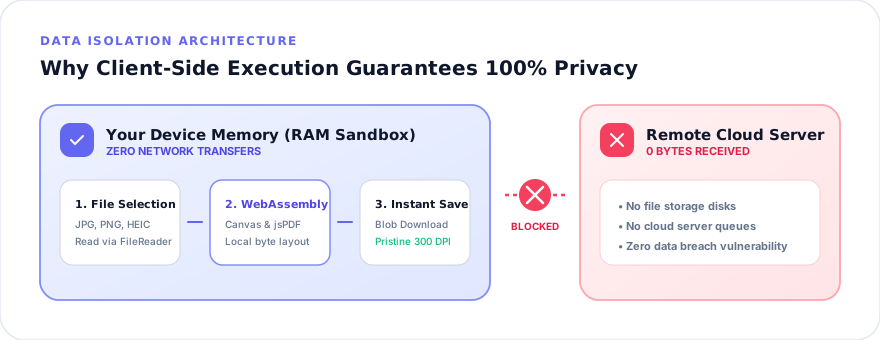
- In-Browser Client-Side Processing: Modern web technology powered by WebAssembly (Wasm) and HTML5. The web page delivers the software code into your browser sandbox, but the CPU execution happens purely on your device. Zero files travel across the wire.
Small-PDF.pro is engineered entirely around this third paradigm. Whether you use our universal Images to PDF workspace or our JPG converter, your files never leave your device.
Legal Risks: HIPAA, GDPR, and Privilege Waiver
For regulated professionals, using server-side document converters is not just a security risk—it can destroy your career or trigger massive statutory fines:
- Healthcare & HIPAA: Transmitting Protected Health Information (PHI) to a cloud service without an executed Business Associate Agreement (BAA) constitutes an automatic HIPAA violation, carrying penalties up to \$50,000 per violation.
- Legal Practice & Attorney-Client Privilege: Under Federal Rule of Evidence 502, transmitting privileged client confidences to an unvetted third-party cloud service can be construed as an intentional waiver of privilege.
- Corporate Finance & GDPR: European GDPR regulations impose strict data controller obligations. Uploading employee payroll data or citizen identification to offshore servers without data processing addendums breaches Article 28.
Need to redact sensitive case numbers or timestamps before submitting court filings? Use our redaction utility to mask confidential details locally before saving.
Compliance Case Study: The Medical Malpractice Firm
In late 2025, I conducted an IT compliance audit for a sixteen-attorney medical malpractice law firm in Pennsylvania. The firm handled catastrophic injury litigation involving confidential hospital records.
During network traffic analysis, I discovered that three paralegals were converting incoming patient radiology scans and hospital billing logs using a widely promoted "free online PDF converter."
Over the previous four months, the firm had uploaded 142 sensitive medical exhibits to an unvetted cloud provider whose servers were located in Eastern Europe. The firm faced potential mandatory breach disclosure, client notification nightmares, and severe disciplinary sanctions.
We immediately transitioned the firm's workflow to Small-PDF.pro. Because our tools execute 100% inside the browser using self-hosted client-side libraries, no data crosses the corporate firewall. The firm passed its subsequent regulatory compliance audit with zero findings.
Architectural Privacy Matrix
Here is how traditional cloud utilities, desktop executables, and Small-PDF.pro compare across critical security metrics:
| Security Dimension | Standard Cloud Tools | Desktop Software | Small-PDF.pro Client-Side |
|---|---|---|---|
| Network Transmission | Full file uploaded to cloud | None (Local execution) | Zero file transmission |
| Server Disk Retention | 1 to 24 hours on remote disk | Local disk only | Zero server storage |
| Installation & Admin Rights | None required | Requires admin privileges | None (Instant browser use) |
| Malware / Adware Risk | Low (Web UI) | High (Freeware installers) | Zero (Browser sandbox) |
| HIPAA & FERPA Safe | NO (Requires BAA) | Yes (If PC is encrypted) | YES (Zero data transfer) |
How to Verify Zero Uploads in Your Browser
You do not have to take our word for it. You can verify our privacy architecture yourself in thirty seconds using your browser developer console:
-
Open Developer Tools: Press
F12or right-click anywhere on Small-PDF.pro and choose "Inspect". - Navigate to Network: Click the "Network" tab at the top of the inspector panel and check the "Fetch/XHR" filter.
- Process a file: Drag an image into our Photo to PDF tool or Images to PDF suite and click "Generate PDF".
- Observe the log: You will see zero outbound POST requests carrying your file data. The file compiles inside your local RAM and triggers an immediate download.
Converting sensitive smartphone receipts or iPhone files? Check our HEIC converter or browse our comparison hub to learn more about our client-side architecture.
Frequently Asked Questions
No. Traditional cloud converters upload your files to remote servers where they may sit on disk for hours. For attorneys, physicians, and accountants, uploading unencrypted client data to third-party servers can waive attorney-client privilege and violate HIPAA or GDPR regulations.
Cloud converters upload your documents across the internet to run on a remote server. Client-side tools like Small-PDF.pro execute the conversion code directly inside your web browser using WebAssembly. Your files never leave your computer or travel across the network.
You can open your browser Developer Tools (F12), navigate to the Network tab, and process a file. You will observe zero outbound POST requests or byte transfers carrying your document data.
Practical Takeaway
Never entrust medical records, legal contracts, or tax returns to cloud converters that upload your data to remote servers. Client-side in-browser tools give you instant conversions with mathematical certainty that your private data never leaves your device.