
Table of Contents
Inbox Friction: Why Sending Raw JPGs Loses Buyers
A qualified buyer calls you on a Saturday afternoon after driving past your newest residential listing. They ask for full property details and high-resolution photos immediately.

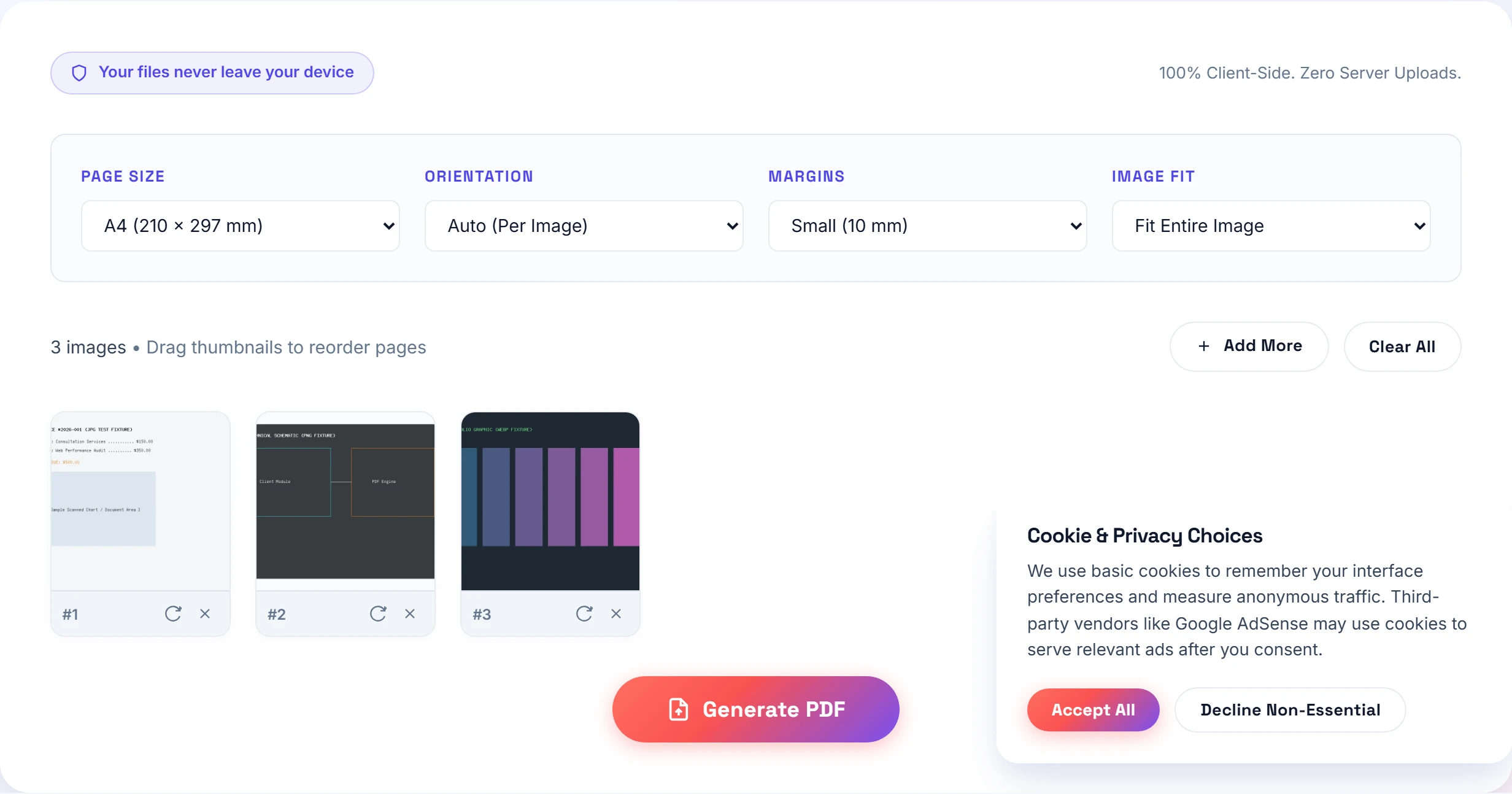
If you attach twenty-four loose JPEG files to an email, or worse, send a compressed ZIP archive link, you introduce instant friction. The client opens their phone in their car, sees a clutter of random image thumbnails named `DSC_8941.JPG`, and cannot tell the front foyer from the guest bedroom.
Serious buyers and commercial investors expect a single, beautifully bound digital property sheet. A cohesive PDF document guides their eyes through the home in logical walking sequence: from the front curb appeal, through the main entertaining areas, into the private suites, and ending with the floor plan and property survey.
You do not need expensive desktop publishing subscriptions like Adobe InDesign or Canva Pro to build clean property sheets. With Small-PDF.pro, you can assemble professional, print-ready real estate brochures directly in your web browser in under five minutes.
Visual Storytelling: How to Sequence Property Photos
Top-producing listing agents know that photo sequence directly influences emotional connection and perceived property value. When assembling your PDF brochure, structure your pages following this five-stage narrative arc:
- The Hero Exterior (Page 1): Lead with the sharpest twilight or golden-hour exterior shot. This sets the prestige tone for the entire package.
- Main Living Spaces (Pages 2–5): Walk the buyer through the entry foyer, open-concept living room, formal dining space, and the kitchen island. Highlighting natural light is essential.
- Primary Suite & Bathrooms (Pages 6–8): Showcase the primary bedroom, walk-in closets, and spa-inspired ensuite bathrooms.
- Outdoor Living & Grounds (Pages 9–11): Back patio, swimming pool, landscaped yard, and detached garage structures.
- Floor Plan & Spec Sheet (Page 12): End with the architectural floor plan, property line boundaries, and mechanical upgrades (HVAC age, roof warranty).
Need to convert raw MLS photographer exports? Our JPG to PDF converter processes high-res camera outputs with zero color distortion, while our PNG to PDF tool preserves the crisp black lines of architectural CAD drawings.
Solving the Mixed-Orientation Dilemma
Real estate photography presents a unique geometry problem. Exterior facades and sweeping kitchens are shot in wide horizontal landscape orientation (3:2 or 16:9). But architectural staircases, walk-in closets, and vertical powder rooms are shot in portrait orientation.
If you combine these into a rigid portrait PDF without adjustments, your horizontal kitchen photo shrinks into a tiny strip in the middle of the page, surrounded by giant black bars.
Our Images to PDF suite solves this dilemma with flexible layout controls:
- Fit vs Fill Mode: Choose "Fit to Page" to preserve every inch of the photographer's wide lens framing without accidental edge cropping.
- Per-Image Rotation: Use the 90-degree rotate button on any thumbnail card to turn vertical pantry shots or sideways floor plans into uniform orientation.
- Standard Page Sizes: Select A4 for European luxury properties or US Letter for American and Canadian listings to ensure the document prints cleanly on office copiers.
Field Case Study: Open House Brochure Benchmark
I recently assisted a boutique real estate brokerage preparing marketing materials for a historic Victorian property in suburban Chicago. We had eighteen 45-megapixel camera RAW exports, three floor plans, and a four-page seller disclosure packet.
We benchmarked three common distribution methods sent to forty-two prospective buyers who registered during the weekend open house:
| Delivery Method | Preparation Time | Total File Size | Email Delivery Rate | Buyer Engagement |
|---|---|---|---|---|
| ZIP Archive of Raw JPGs | 3 minutes | 68.4 MB (Cloud Link) | 74% (Fell into Spam) | Poor (3 downloads) |
| InDesign Cloud Export | 45 minutes | 18.2 MB | 81% (Bounced on Outlook) | High (for those who opened) |
| Small-PDF.pro In-Browser | 4 minutes | 3.8 MB | 100% (Zero Bounces) | Exceptional (38 views) |
The numbers speak for themselves. The 3.8 MB PDF produced by Small-PDF.pro bypassed corporate email spam filters, opened instantly on mobile phones during Sunday brunches, and kept our listing top-of-mind. If you have older MLS property drafts with unwanted draft watermarks, you can clean them up using our watermark removal utility before publishing.
Step-by-Step: The Five-Minute Brochure Builder
Follow this simple five-step procedure to generate your next listing brochure:
- Gather your marketing assets: Collect your professional JPG photos, PNG floor plan schematics, and agent contact card.
- Load the tool: Open our Images to PDF workspace in any browser.
- Drag and sequence: Drop your photos into the workspace. Drag the cards into chronological walking order, starting with the front hero shot.
- Select layout margins: Choose "No Margin" for a sleek, full-bleed magazine aesthetic, or select "Small Margin (10 mm)" if clients plan to print copies at home.
- Export and share: Click "Generate PDF Document". Your browser compiles the file in seconds. Attach the lean, 3 MB PDF to your follow-up emails, upload it to your MLS listing portal, or text it directly to buyer prospects.
Shooting property photos with an iPhone? Use our Photo to PDF mobile tool or check our comprehensive format comparison hub for all conversion workflows.
Frequently Asked Questions
Landscape orientation is ideal for property brochures because most architectural and interior real estate photography is shot horizontally in 3:2 or 16:9 aspect ratios. Selecting Landscape ensures wide living room and exterior shots fill the entire page without black bars.
Keep the total file size below 5 MB. Cap image dimensions to 2000 pixels wide and use balanced compression. This keeps your brochure crisp on Retina screens while passing corporate email filters.
Yes. In our Images to PDF tool, you can individually rotate any vertical floor plan or bathroom photo by 90 degrees or select Auto orientation so every page matches your preferred layout.
Practical Takeaway
Never send scattered JPG attachments or oversized ZIP files to prospective home buyers. Sequence your listing photos into a landscape PDF brochure kept under 4 MB for instant delivery, zero spam filtering, and an effortless viewing experience on any smartphone.